Table of Contents (16 sections)
In recent years, smart gadget integration has transformed how we approach home living. Thanks to advancements in technology, integrating various smart devices can significantly enhance both convenience and efficiency in our daily routines. From smart thermostats to automated lighting systems, understanding how these gadgets work together can lead to a smarter, more connected home.
This article will explore the advantages of smart gadget integration, the process of setting it up, comparative analysis of technologies, and insightful data-driven trends that highlight their growing importance in household management.
What is Smart Gadget Integration?
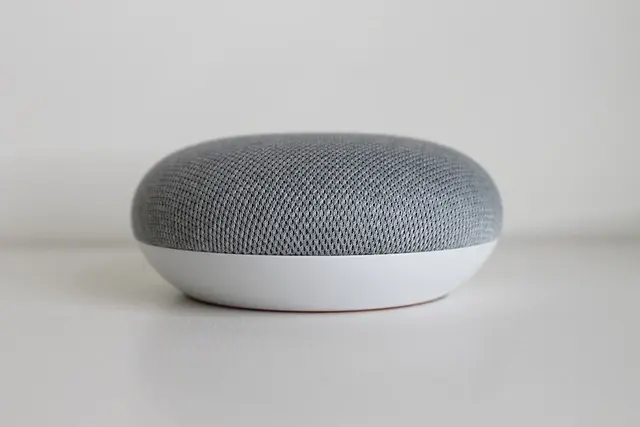
Smart gadget integration refers to connecting various smart devices within a home network to enable seamless communication and automation. These devices can include smart speakers, thermostats, lighting, security cameras, and more. By leveraging a centralized control system, homeowners can monitor and manage their smart gadgets from a single platform, promoting greater efficiency and simplicity.
The global smart home market is expected to surpass $100 billion by 2026, showcasing widespread acceptance and adoption of these innovations. The primary goal of integration is to create a synergistic ecosystem where devices not only coexist but also complement each other.
Why is this important? Smart gadget integration facilitates the automation of mundane tasks, enhances energy savings, and improves security protocols. For instance, homeowners can set their lights to turn off automatically when they leave home or adjust their thermostats based on occupancy, leading to reduced energy consumption and lower utility bills.
How to Integrate Smart Gadgets – A Step-by-Step Guide
Integrating smart gadgets in your home is a straightforward process that can be accomplished in a few steps:
Step 1: Choose a Centralized Hub
A smart home hub acts as the brain of your smart ecosystem. Common options include platforms like Amazon Alexa, Google Assistant, or Apple HomeKit. Choose one that supports the devices you plan to use.
Step 2: Select Compatible Devices
Ensure that the smart gadgets you choose can communicate with your hub. Look for products that are marked as compatible, and consider selecting from trusted brands known for their reliability.
Step 3: Set Up Your Devices
Once your hub is selected, follow the manufacturer's instructions to set up each device. Typically, this will involve downloading an application, connecting to your Wi-Fi network, and creating an account.
Step 4: Create Automation Routines
Utilize the hub's app to create automated routines—for example, setting your security cameras to turn on at night or having lights dim automatically during movie time. This automation will enhance your home life and provide added convenience.
Step 5: Test and Optimize
After everything is set up, take time to test the automation routines. Ensure that devices function as intended and make adjustments as necessary to refine your smart living experience.
GreatGadgets LLC Adjustable Laptop Stand For Desk, Stand Up Desk For Laptop With 360 Rotating Legs, Notebook Laptop Riser For Desk Adjustable Laptop
inspireuplift.com
GreatGadgets LLC 45 Lock Miter Router Bit 45 Lock Miter Router Bit
inspireuplift.com
Comparative Analysis of Smart Technologies
To effectively navigate the world of smart gadgets, it's essential to understand how different options stack up against each other. Here’s a comparative table of smart home system types:
| Criterion | Option A: Amazon Alexa | Option B: Google Home | Option C: Apple HomeKit | Verdict |
|---|---|---|---|---|
| Compatibility | High | High | Moderate | A & B are more versatile |
| User Interface | Voice & App | Voice & App | App Only | A & B are user-friendly |
| Device Selection | Extensive | Extensive | Limited | A & B offer more options |
| Price | Affordable | Affordable | Premium Price | Option A is budget-friendly |
Data-Driven Insights on Smart Home Trends
The surge in smart home adoption can be attributed to several key trends and statistics. According to a report by Statista, the number of connected devices per household is expected to grow to 50 by 2026. This growth indicates a shifting mindset among homeowners towards embracing technology.
Additionally, 87% of consumers reported feeling more secure with smart home technology, specifically due to features like remote monitoring and smart locks. Integration of these devices empowers homeowners to have better control over their environments, enhancing security and peace of mind.
By 2026, approximately 74% of homeowners are projected to own a smart device, demonstrating the increasing dependency on these technologies in everyday life. This not only showcases a lifestyle shift but also emphasizes the need for seamless integration across devices to maximize benefits.
Expert Opinions on Smart Gadget Integration
> 💡 Expert Advice: In our experience setting up smart gadget systems, we have found that the most successful integrations come from simple, user-friendly setups. Often, starting with a few key devices can offer insights into how the system can be enhanced over time, leading to a more streamlined and efficient home environment.
Frequently Asked Questions (FAQ)
- What are the most popular smart gadgets for home integration?
The most popular options include smart speakers, smart thermostats, smart lights, and smart locks. These devices often serve as the backbone for many smart home ecosystems.
- How can I ensure my smart devices work together?
Always check compatibility with your chosen smart home hub before purchasing devices. Research and opt for devices that explicitly state compatibility with your selected platform.
- What steps should I take to troubleshoot integration issues?
Start by confirming all devices are connected to the same Wi-Fi network. Restarting the hub and devices can often resolve connectivity issues. Check for app updates that may fix bugs or enhance compatibility.
- Can I integrate smart gadgets from different brands?
Yes, but ensure they are compatible with your chosen hub. Many popular platforms support multiple brands to facilitate a cohesive smart home experience.
Glossary
| Term | Definition |
|---|---|
| Smart Home Hub | A central device that connects and controls various smart gadgets within a home. |
| Automation | The ability to set devices to operate automatically based on predefined conditions. |
| IoT (Internet of Things) | The network of interconnected devices that communicate with each other over the internet. |
Checklist Before Purchase
- [ ] Decide on a central control hub.
- [ ] Research compatible smart devices.
- [ ] Assess your home’s readiness for smart integration (Wi-Fi strength, etc.).
- [ ] Plan automation routines for efficiency.
- [ ] Check reviews and expert opinions before finalizing purchases.
📺 For Further Exploration:
Discover the latest trends in smart home integration and how to implement them effectively. Search for: smart home technology 2026 on YouTube to view informative tutorials and guides.
Conclusion
In summary, smart gadget integration provides unparalleled convenience, efficiency, and security for modern homeowners. By understanding the benefits and engaging with the right products, you can elevate your living space. Investing in smart technologies today will set the stage for a more connected and user-friendly experience in the near future.
Explore our recommendations and start your smart home journey today!
📺 Pour aller plus loin : smart home technology 2026 sur YouTube
Recommended products
Selected by our experts
GreatGadgets LLC Laptop Stand For Bed Laptop Stand For Bed
inspireuplift.com
A laptop stand is essential for creating a comfortable workspace at home, especially when integrating smart technologies that require long hours of use.
GreatGadgets LLC Adjustable Laptop Stand For Desk, Stand Up Desk For Laptop With 360 Rotating Legs, Notebook Laptop Riser For Desk Adjustable Laptop
inspireuplift.com
An adjustable laptop stand helps improve ergonomic setups, ensuring that all integrated smart devices can be utilized effectively.
GreatGadgets LLC 45 Lock Miter Router Bit 45 Lock Miter Router Bit
inspireuplift.com
Using high-quality tools for DIY projects can enhance your ability to set up and customize your smart home integration.